Zenario 11.2 launches soon with great new features, see below for details.
Visitor-facing features
Events now with ICS file download
The Event content type has been improved. Visitors can now easily download an ICS file from each Event content item, to easily add it to their calendar.
Structured data for search engines
LD+JSON data is now embedded in the source of each Event content item, for better readability by search engines and AI scanners.
Advanced Search for Visitors
The on-site Advanced Search now gets results from pages containing Banners (nested or not), and not just WYSIWYG and metadata areas.
Powerful new administration features
Documents with automatic language detection and summarisation
Hierarchical documents have been greatly upgraded, with three new features:
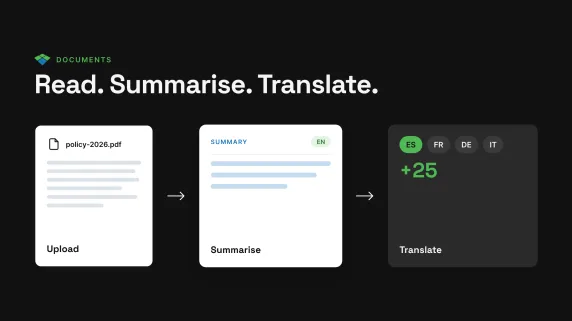
Documents are now scanned to identify the language they contain
When uploaded, a Summary of the document will be created automatically
The Summary can be translated automatically into any of about 25 additional supported languages.
This feature requires Zenia to be installed.
Picking Documents and Content Items while Editing
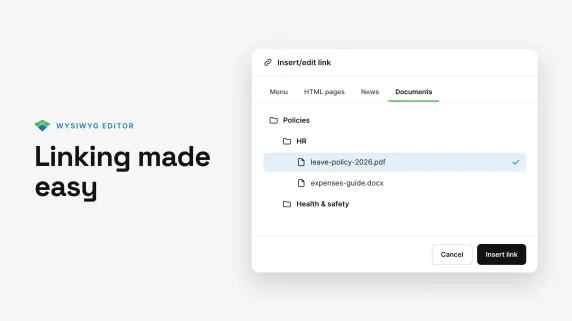
The WYSIWYG has been improved when clicking the "Insert/edit link" button. It's now easy to:
Browse the menu and select a content item
Browse HTML pages, News items, Document content items, and other content items in flat views
Browse hierarchical documents in folder view.
Scheduled Review & Removal
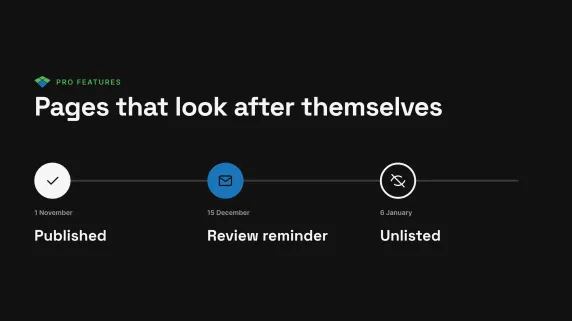
There are now scheduled review and removal features (in the Pro Features module).
These features allow an administrator to set a date, or number of days, in the future. At this time, with the review feature, Zenario will send a reminder email to the administrator to review the page. With the remove feature, it will unlist the page at that time, and confirm by email.
This is a helpful feature for pages that have relevance for just a period of time (e.g. seasonal content), or which need reviewing or deleting after some time.
Statistics and Analytics
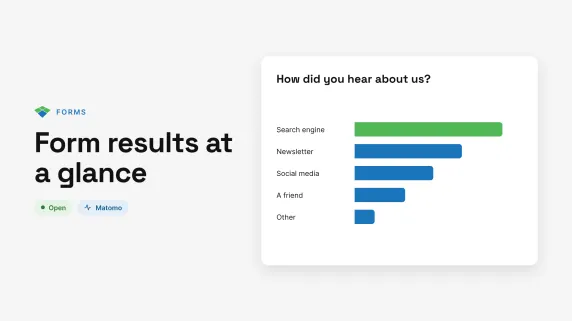
There are now statistics available for form responses, and for users and contacts.
Wherever a form field is a radio selector or a select dropdown menu, these are gathered into statistics and can be viewed as a bar graph.
Form submissions and the Extranet Registration module now support sending Events to Matomo Analytics. By creating a Goal in Matomo, and selecting the option that it's recorded when the site sends an Event, you can record form submissions and user registrations.
Open/closed status Forms now more clearly show whether they are open, open for a certain period of time, or closed.
Translating Banners
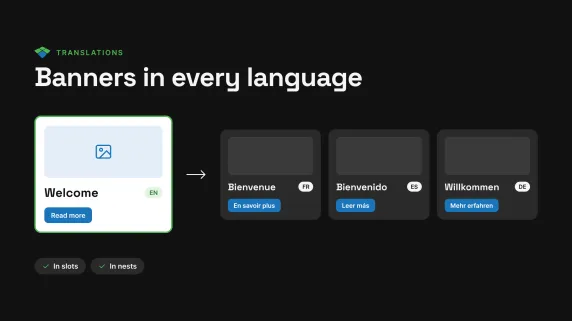
We have improved the system for translating Banners, including those directly in slots on a page or layout, and those in Nests.
Also new
Admin Toolbar and Menu Management
We have simplified the admin toolbar, by removing the Menu tab altogether.
Furthermore, we have simplified the administrator permissions around editing the menu. It's now possible for an administrator to only have the "Create and edit draft content items (_PRIV_EDIT_DRAFT)" permission and be able to create a content item, give it text for the menu, and to be able to edit the menu text.
A separate permission "Manage menu nodes (_PRIV_MANAGE_MENU)" gives an administrator more wide-ranging control over the entire menu, to change text, restructure it, and change other menu node properties.
AI-powered Suggest buttons
We've added "Suggest" buttons in metadata boxes, so that when there is a Summary or browser Description, the "Suggest" feature — via Zenia — generates a summary based on all elements of a web page, including Banners.
Previewing and Reviewing Pages, and Style Editing
The Review interface on the front end, and the Style Editor, now show a more faithful view of the page in both desktop and mobile view, and have the ability to run JS so that rendering is more faithful to the final appearance.
Zenario Administrators and New Releases
Zenario now keeps track of the latest version of Zenario that an administrator has seen. When Zenario has been upgraded, it now shows a link to the information page for that latest update.
Modules and Settings
When viewing Organizer → Modules and selecting a module that has site settings or system settings, it's possible to select the module in the Organizer panel and see a "cogwheel" icon that links to settings for that module.
Image Management
The Special Images panel now has a "where it's used" column.
Installer
The Zenario installer now offers to create a number of starter pages when creating a new site, such as "About us".
Site & system settings
Zenario now has two areas of settings (these are in Organizer → Configuration):
Site settings — settings for regular administrators
System settings — more technical settings for people responsible for the Zenario installation.
This makes a clearer distinction between settings for the organisation that owns the site and technical settings, and puts technical settings such as passwords and file locations out of reach of regular administrators.
There is also a new administrator permission to make a distinction between site settings and system settings.
In addition, certain domain-related settings no longer appear in Base/Community Features, and instead are now in Pro Features.
The option to hide the "generator" tag from web page source is now in Pro Features.
Underlying system updates
Improved Cache Control
There is now better control over the Cache (now in System Settings).
We have separated plugin and page cachings settings because on many sites we found that the rate of reading from plugin cache directories was quite low, and so the effort of writing to the cache was likely not to be repaid by reduced reads.
Page caching
Always recommended to be enabled, and brings great speed advantages.
Plugin caching
Recommended only for sites with private member areas, or where a lot of pages are built from heavy database queries.
Security
Password security is now much stronger. Both administrator and user password systems now use the tougher Argon2 cryptographic hashing algorithm.